


If in need of any help registering please see our Paddy Power App user guide.
App Review
Paddy Power has always been ahead of the game in the betting market and its mobile betting service is no different.
They have worked hard to get everything right and the results are impeccable. From its ease of use to a simple design, the app makes any bet you wish to make just a couple of taps away.
There’s a huge range of markets, from the ever-popular football and horse racing to greyhound racing and all major US sports. Everything gamblers should need is within this app. Users are also blessed with some fantastic novelty bets, in what is most certainly the most expansive novelty market out there.
The app is essentially the desktop site on mobile. This means users can place bets on any market, anytime, anywhere.
Within a second of opening the app, all the live betting markets are shown, alongside fantastic offers and a toolbar that can be customised to suit the user’s preferences.
PaddyPower Review Of Features
This bookmaker prides itself on being revolutionary. Therefore, the Paddy Power app is crammed full of incredible features worth utilising while playing the markets.
There are dozens of fantastic little tricks, shortcuts and special features within the app. So many, so it’s a little difficult to choose the very best.
The bottom menu bar contains a number of icons, enabling users to seamlessly switch from sports to casino offerings, as well as a Cash-Out option to quickly collect any winnings. You can read my guide on how to cash out on Paddy Power here.
It has a fantastic casino offering built-in, as well as bonuses being clearly highlighted within the dedicated promotions section and across the home page.
Some of the more standout features we’ve highlighted below, with many taking this app to the next level.
Great Functionality
The functionality of the Paddy Power app is comfortably one of its best features. It’s so simple to use with navigation among the best of any app.
On the homepage, there is a row of icons at the top of the screen. These can be edited to display the sports and markets that the person uses the most. users can then quickly tap on a sports icon upon opening the app and be presented with all the events and markets relating to it.
By tapping the football icon, for example, you will be taken to directly to all the latest football odds. There’s almost every league imaginable. There’s an incredible array of markets to choose between. From Match results to booking points, Paddy Power has a broad choice of popular and exotic markets to choose from.
Adding selections to the bet slip is swift and easy, as is placing singles and accumulators. The opportunity to wager more advanced bets such as a Lucky 15, Yankee or Trixie are also available directly from the bet slip.
Live Sports Betting
Most punters these days need live betting as part of a betting app’s offering. Paddy Power doesn’t disappoint. With one of the most expansive lists of live betting, the app is a credible option for any punter who enjoys in-play.
Tapping on the ‘In-Play’ icon in the customisable menu bar takes users to all the live betting options, across all sports events.
Punters can also cash out during live sporting events on most markets. It is advised to check that the cash-out feature is available first before placing a stake as some markets and specials don’t allow it.
Live Streaming
On top of betting in-play, users can watch their bet come in too!
The app offers up streams across a number of different sporting events. A real bonus for most punters. Meet the minimum wager on the game in question and if a live stream is available, it will be accessible from the event’s markets page.
The likes of Serie A, Ligue 1 and Eredivisie are all available to watch. All horse racing meets in the UK are available to be watched on live streams for free and other sports such as greyhounds, basketball and handball frequently have live streaming capabilities attached to them.
Paddy Power’s Bet Builder
The Bet Builder tool is one of the newest football and basketball betting features. You can now combine numerous markets together and instantly get odds on all of your selections as a single bet. Select a valid event and look for the bet builder option within the top menu bar of the markets page.

The bet builder tool is a little clunky, compared to other bet builders available. However, that is only down to the number of markets you have available. You may have to scroll down a while to find your preferred market, but personally, I would prefer to have more markets to choose from.
Some of my most used bet builder markets here are:
- Match odds
- Player to have a shot
- Both teams to score
- Player to have a shot on target
- Player bookings
- Anytime assist
There are plenty more markets available. There were around 50 markets to choose from the last time we checked.
Paddy Power also offers a bet builder insurance from time to time, so keep your eye out for this offer. The promotion, when available, returns your stakes (up to a maximum of £10) if one leg of a bet builder, consisting of 4 or more selections fails to come in.
Request A Bet Paddy Power Style!
If the bet builder isn’t providing the markets required or if you are looking to bet on an event that the bet builder feature is unavailable on, you can request a specific bet to be made available directly to the Paddy Power support team.
They will then pass on the request to the traders for a decision to be made on whether to make it available and if so, at what price. This information then gets fed back to the user who made the request, either declining or with a link directing to the bet requested.
Bet requests can be made by messaging Paddy Power on Twitter (@AskPaddyPower) or by email (SMPriceRequests@paddypower.com)
Football Betting on the Paddy Power app
There are a lot of advantages to betting on football with Paddy Power. One of those is the Power prices that are available on feature matches and competitions. These regularly boost football betting markets to make them the market-leading price.
Another reason why Paddy Power is a good football betting app is their 2 up – You Win offer*. Paddy Power will pay out early as a winner if your team goes two goals up, even if they go on to draw or lose. This offer is available across all of the major leagues and tournaments. Check out the current league on the promotions tab on the app.
There’s the new bet builder feature providing more options than ever before and an ‘access’ tab that is perfect for picking multiple selections from the same day, league or competition.
The live football betting hub is also excellent. You can quickly see all the live games and scores and place quick bets on the match results. Tap into any of the matches to get the full list of live betting markets. On major football matches, you can find in excess of 50 markets in play.
Horse Racing Betting
This app probably excels the most in its horse racing section.
Paddy Power is one of the few to offer live streaming on all UK and Irish racing for free. All that is required is for you to be registered and logged in.
Other bookmakers offer live streaming on horse racing, but there are heavier restrictions. For example, having to place a net on the race in question or to have a funded account. There’s none of that nonsense with Paddy Power. Log in, navigate to the race markets and hit the watch live button to get straight to the live stream.
Free Live Streaming

Information and statistics from the racing post are integrated in to the racecards. There’s also a list of tips provided from a whole host of media sources, such as The Times and The Guardian.
There’s not just horse racing from the UK and Ireland on the app. Racing from all over the world is covered. However, you will find a more limited choice of markets.
Specials are abundant, as are the antepost markets, providing betting options on races and festivals up to 12 months in advance. Virtual racing is also ready to be played. Virtual races get underway every two minutes. This serves as a nice way to keep you entertained in between the real races.
Our Verdict
We’re huge fans of the desktop service and that only transfers itself to the Paddy Power app. With an in-depth series of markets and selections, users are never short of finding a decent wager to try and win big on. Registered customers get a chance to win prizes with the Beat the drop game, 15 rounds to see how much you have left at the end – Can you beat the drop? (We can’t – yet!) – Terms apply, 18+, offer may be withdrawn at any time.
Its smooth navigation makes it perfect for both new and experienced punters. The promotions on offer also make it that much more delightful to play.
It really is worth opening a Paddy Power account and downloading the app. You certainly won’t regret it!
Don’t forget to follow us on Twitter where we share with you all the latest app updates from the top UK betting apps, as well as provide our opinions on the latest sports news.

Playtech, an industry-leading specialist in gaming technology, developed the Paddy Power casino app and the results are fantastic. The mobile casino is responsive, enjoyable and safe. There’s a lot on offer here, with a range of games to choose from and lots of different features to explore.
Industry Leading Development
The Paddy Power Casino app has recently been updated and as a result is now offering 250+ different games for users to play on. Table Games, Video Poker, Scratch Cards, Live games, Live dealer options, 5 Reel Slots and 3 Reel Slots are all available here.
Most of these games are really interactive. They have clearly been developed with current smartphones in mind. Some of the games even use swiping and tapping of the screen to perform acts in the game or simply to activate them.

Paddy Power claim that someone wins on the Paddy Power bingo app every twenty seconds. Popularity like this brings about a large number of players an therefore, big jackpots.
Tickets start from as little as 2p each and can be bought across a whole host of rooms. Chat rooms are available for those who like to get social with their bingo and slots are also side-kicked in to the app, to add a nice degree of variation.
Slingo games are also available here. These are games that combine slots and bingo together to create whole new genre of entertainment.

Paddy Power live casino provides a platform so that users can enjoy playing live casino games such as Live Roulette, live mobile Blackjack, Baccarat and many other traditional table casino games.
There’s also new and quirky live games such as Crazy Time, The Money Drop and Adventures beyond wonderland to try out.

The Paddy Power games app shifts the focus over to the slot machines. There’s over 1100 slots titles to sift through and try out. Although this is a huge catalogue, useful search, filter and sort features help to bring the games most likely to be of interest to the top of the screen.
Megaways slots and big jackpot games are in abundance here and when users are tired of spinning the reels, they can transition across to live dealer games or online casino games without having to leave the app.

Poker can be accessed from the Paddy Power Sports app menu, but for those who have nothing but Poker in mind, the Paddy Power poker app will provide a more immersive experience.
It has styles that suit those poker players looking for a quick ten minute fix, along with those wanting hours worth of action from a multi-table tournament.
A newly added feature called Club Games now lets users host private matches between friends on the poker app, with rules set up as required.

The Paddy Power Onside app blends the shop and online experience together seamlessly.
The app will keep track of all of the bets placed on the high street, making sure users can see exactly how much they are up or down over a given period of time.
The tracker also works well for unsettled bets. Live audio and video streams are integrated in to the app and are offered on selections the user is tracking.
The app also provides cash-out options on unsettled bets placed in Paddy Power shops. Now users can make profits from their high street bets, even if they lose – if they can cash-out wisely.
The quickest way to keep up to date with their offers is to follow them on twitter @paddypower. As well as the latest offers, they’ve got some fantastic banter and loads of fun posts and free bet giveaways.
There’s not really any difference between the official Paddy Power android app, iPhone app and the mobile site, it’s just there for people who prefer having an “app” installed.
If you’re trying to use Paddy Power outside the UK then it depends on the country as to whether it will work. The Google Play app is restricted to the UK and Ireland territories only. The mobile site will work in some countries.
Paddy Power are more than happy to evaluate and price up bets that are not currently available on the app. Tweet them your request from Twitter.
Tweet @askpaddypower directly or include #WhatOddsPaddy with what you are looking to bet on. The Paddy Power team will then come back to you with a price.
If the bet holds too much risk, Paddy Power may well politely refuse the request.

Unfortunately not, when on a smaller screen you are automatically directed to the mobile site. If you are on a larger screen tablet, like an iPad Pro you will get the desktop site.
We will now demonstrate how to get to the responsible gambling tools on the Paddy Power app using an iPhone. However the steps shown remain the same, regardless of device.
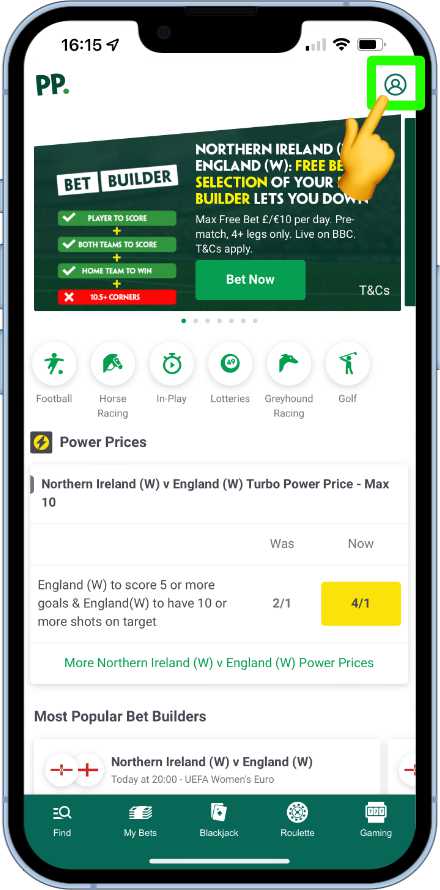
From the home page, we head to the user account settings by tapping on the user icon.
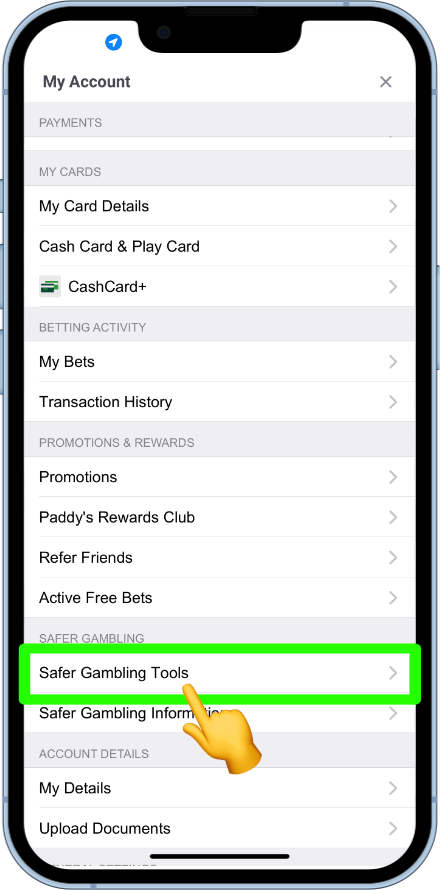
Within the list of options that show, there should be a section labelled safer gambling. If this section is not visible, then the list may need to be scrolled down. From this section, tap on the safer gambling tools option.
All five of the safer gambling tools should now be listed.
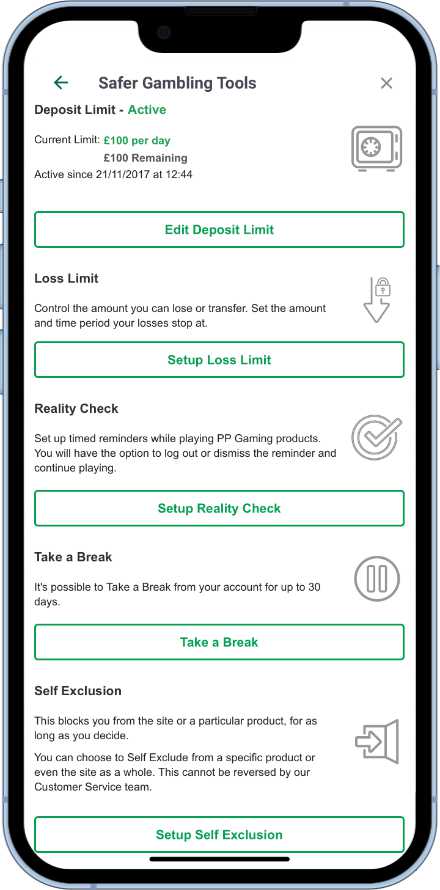
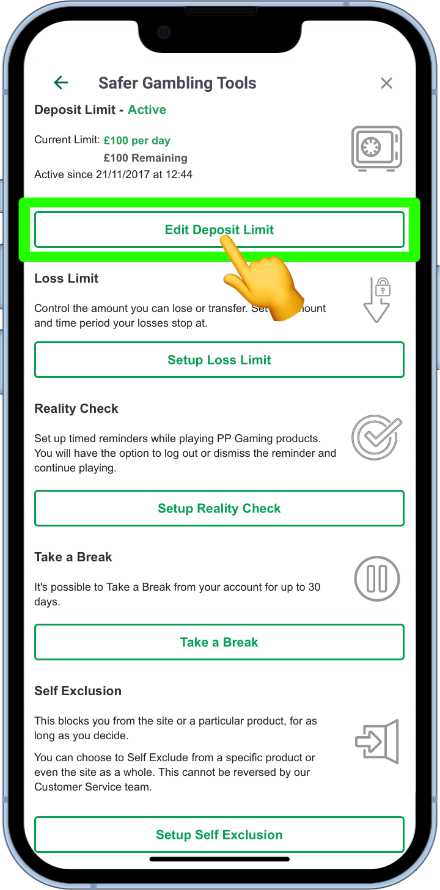
The deposit limit tool is the first tool on the list. A summary of any existing limits will show. To change the current limit(s), tap on the “Edit Deposit Limit” button.
From here daily, weekly and/or monthly deposit limits can be set. To choose the time limit, tap on the appropriate tab.
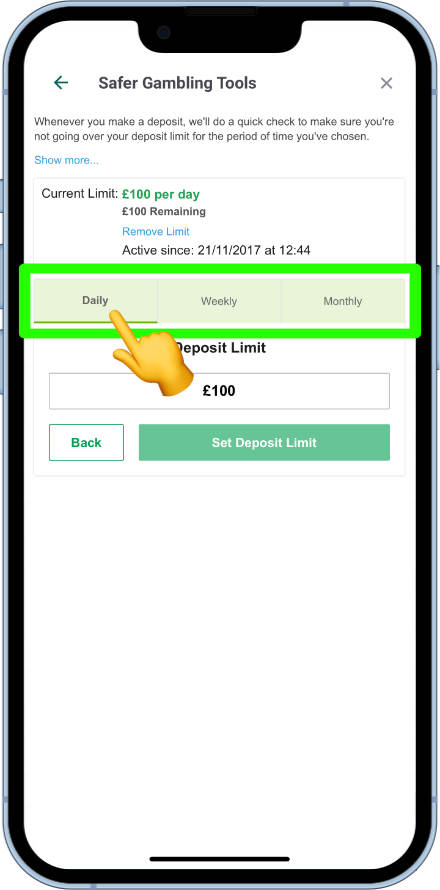
When the correct time period is selected, tapping on the deposit limit box will cause the numeric pad to pop up for a new limit to be entered.
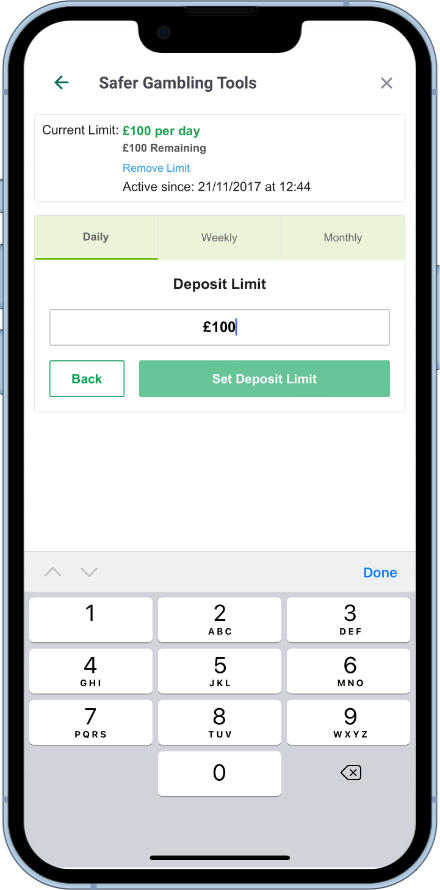
Enter the new limit desired and then tap on the “Set Deposit Limit” button to complete the setup.
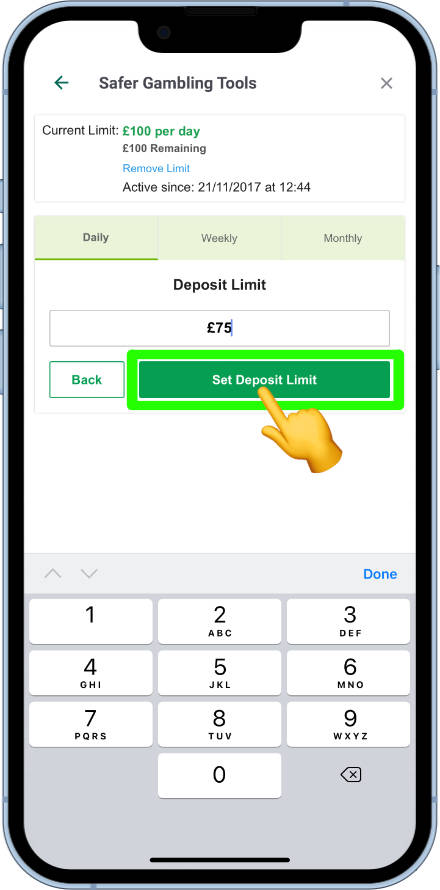
if the new limit is less than the limit set before, the new amount will be activated immediately. If the deposit limit request is to raise the limit, the change will take 7 days to come in to effect.
This gives users plenty of time to think over the decision before the new limit is implemented.
Loss limits can help customers from tumbling out of control when experiencing a bad run of form. These can be set over different periods of time and across select services offered by Paddy Power. To get started, tap on the Loss limit button.
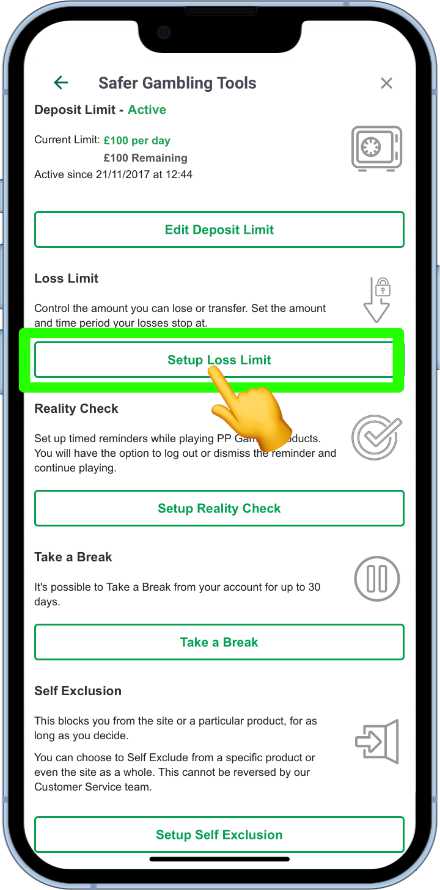
Three editable fields will now be present. These are.
- Products – the services to be applied to the loss limit (sports, casino, etc.)
- Time period – week, day, month or year.
- Limit amount – the desired loss limit amount.
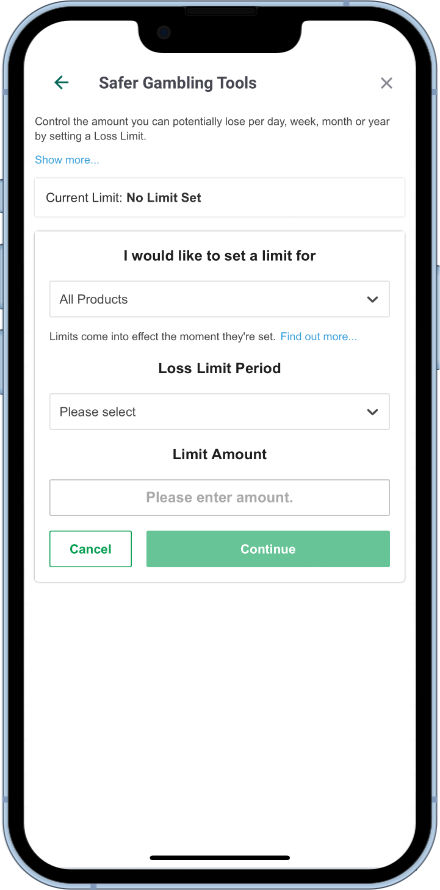
Enter the appropriate details in to each field, depending on preference. Now tap on the Continue button.
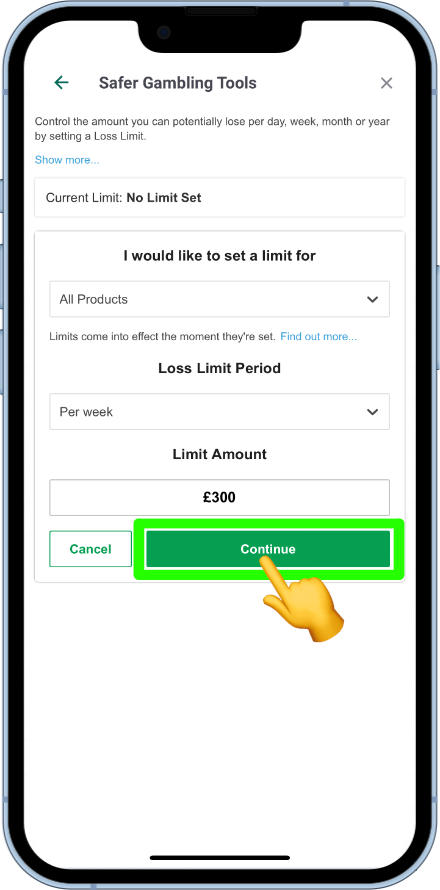
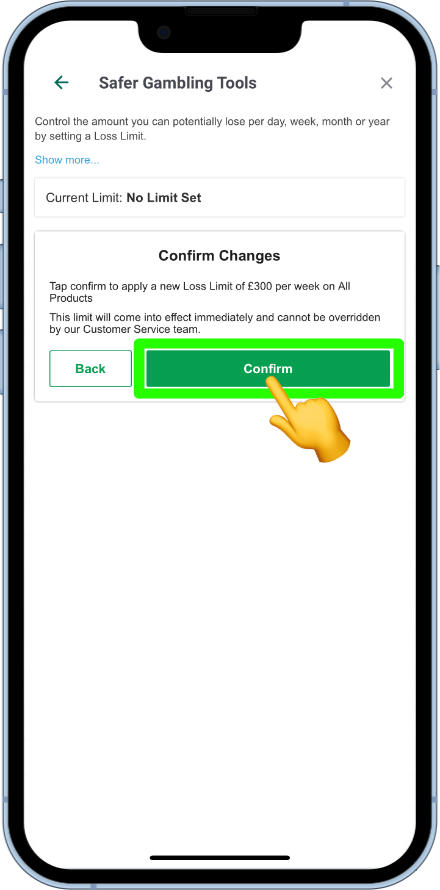
a small summary will now show, rounding up the request that is being made for the customer to review. If they are happy that the summary matches their wishes for a loss limit, then the “Confirm” button can be tapped to set the limit in place.
It can be known to lose track of time and surroundings when playing games on the Paddy Power app. Therefore, a tool is available to provide reminders after a certain amount of time of gameplay. Here’s how to get a Reality Check set up.
Tap on the Setup Reality Check button from the list of Safer Gambling Tools.
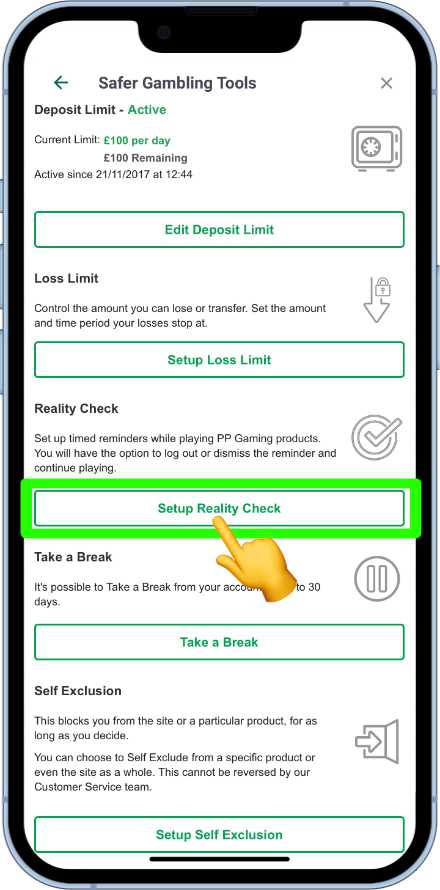
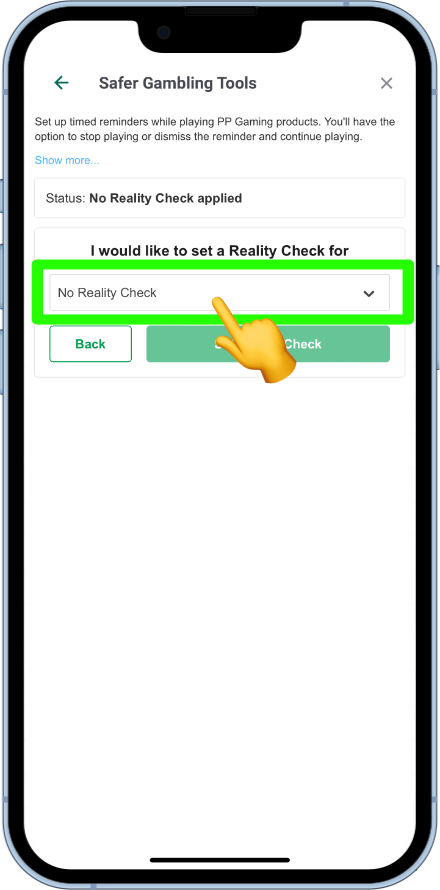
The current status of the tool will now be shown, with the option to modify underneath. To change the current status to a different time period tap on the box showing a downward arrow.
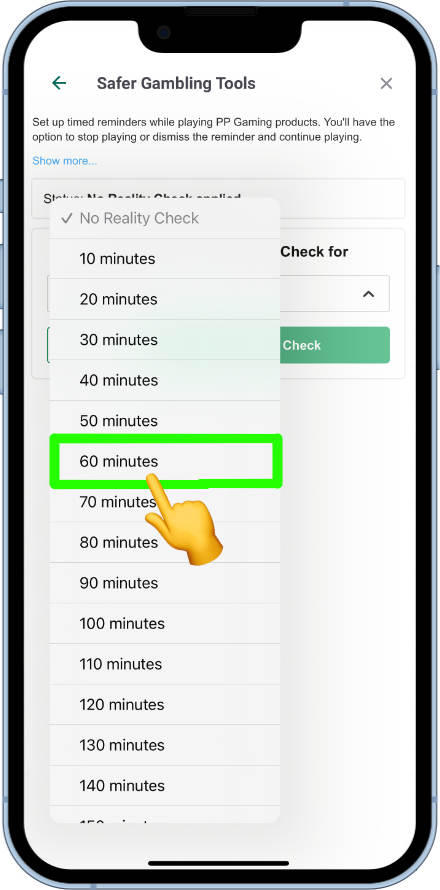
A list of time periods will now pop open. These start at ten minutes and go up in 10 minute increments, up to 180 minutes. Tap on the desired time period.
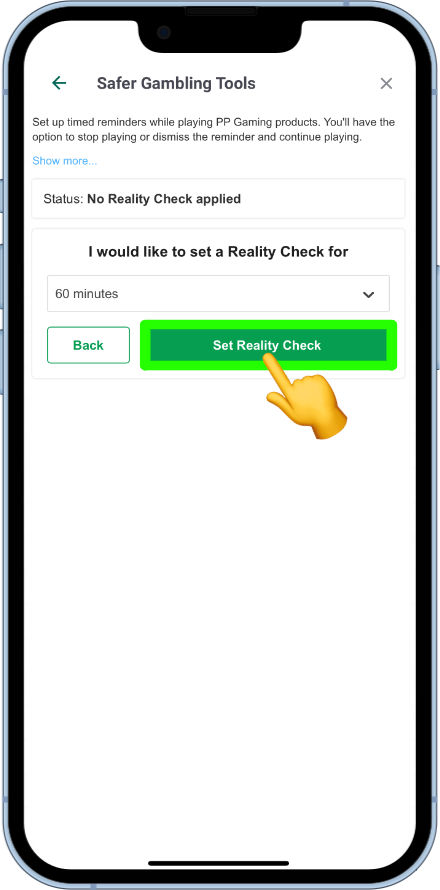
Now tap on the Set Reality Check button to activate the changes.
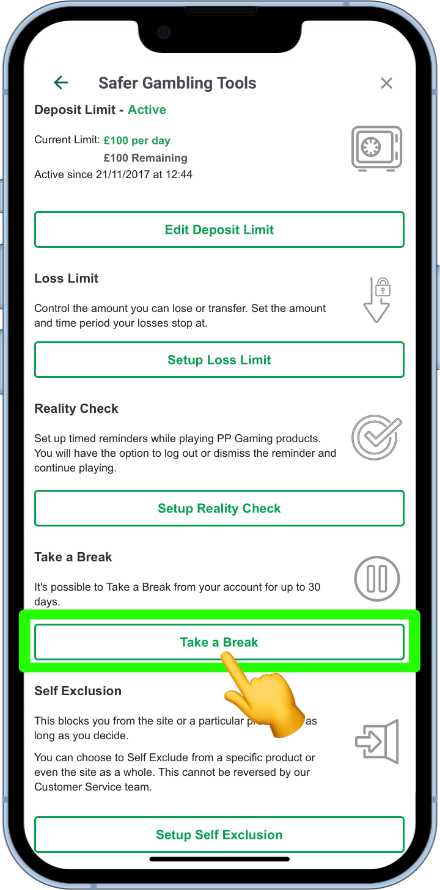
The Take A Break Tool is available for those who temporarily want to stop themselves from being distracted by gambling. This feature will shit down a user’s account for:
- 24 hours
- 48 hours
- 72 hours
- 7 days
- 30 days
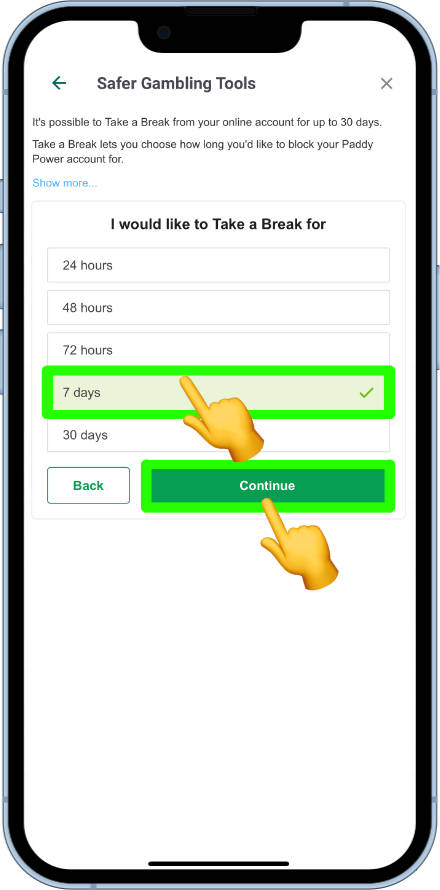
After the set time period has expired the account will then be open as normal, exactly the same as it was before the temporary closure. Tap on the Take A Break tool to get started.
The list of times will now show. Choose the time that is the most appropriate and then tap on the continue button.
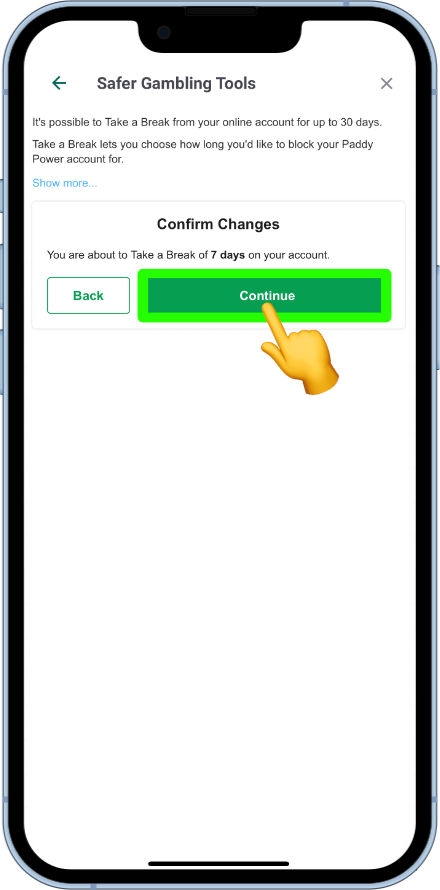
A confirmation box will now appear informing the user the account is to be closed for the time requested. Tapping the confirm button will complete the process.
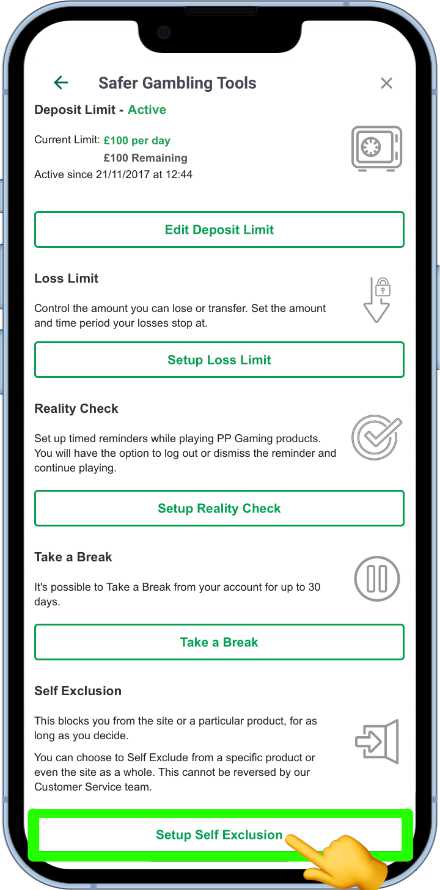
This tool should be used for those users who are looking to forget about gambling for six months or more. Tapping on the Setup Self exclusion will open the relevant options.
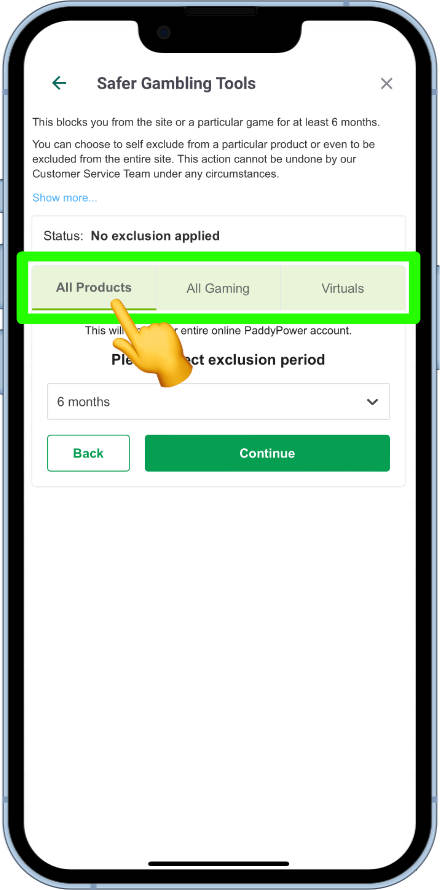
Users can choose to self exclude from:
- All products
- Gaming products
- Virtual products
Tap on the option that is wanted.
customers can choose to exclude from these products for:
- 6 months
- 1 year
- 2 years
- 3 years
- 4 years
- 5 years
- Permanently
Tap on the time period field to reveal these options.
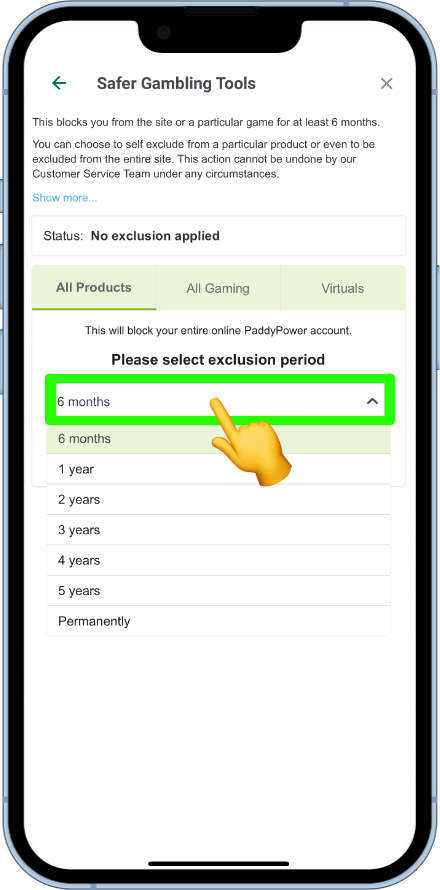
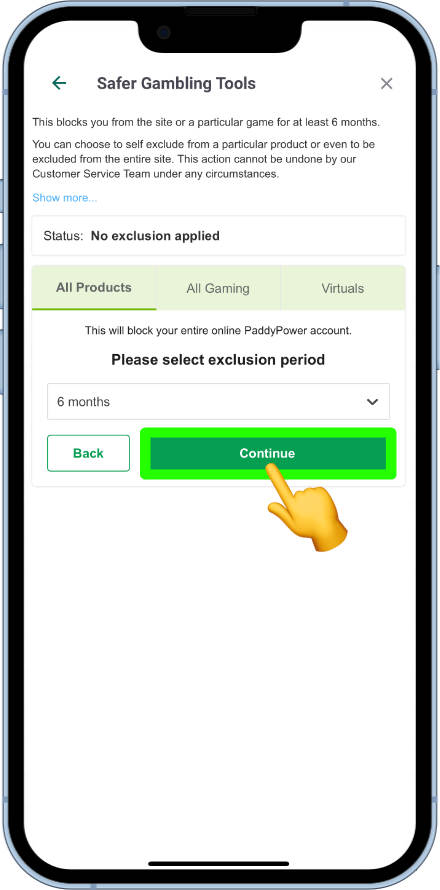
Now tap on the time period required. The time will now show in the box. Select the continue button.
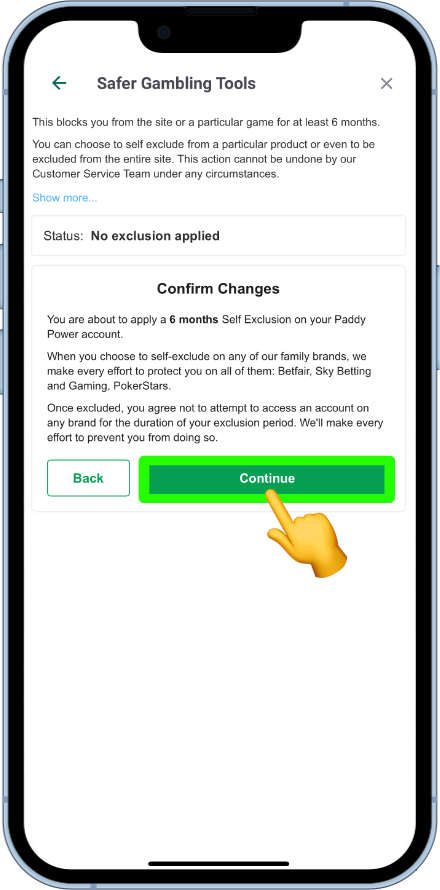
A confirmation box will now show, explaining that Paddy Power will block you from their services and their wider brands, such as Skybet and Betfair for the time period requested. If the user is happy that all details are correct they can tap on the continue button to complete the process

To place a bet on the Paddy Power app, the user must have a funded account or have a free bet available.
In this example, the user is looking to place a £5 accumulator on the upcoming Premier League matches.
From the Paddy Power app’s home page, the user can go ahead and tap on the football icon.
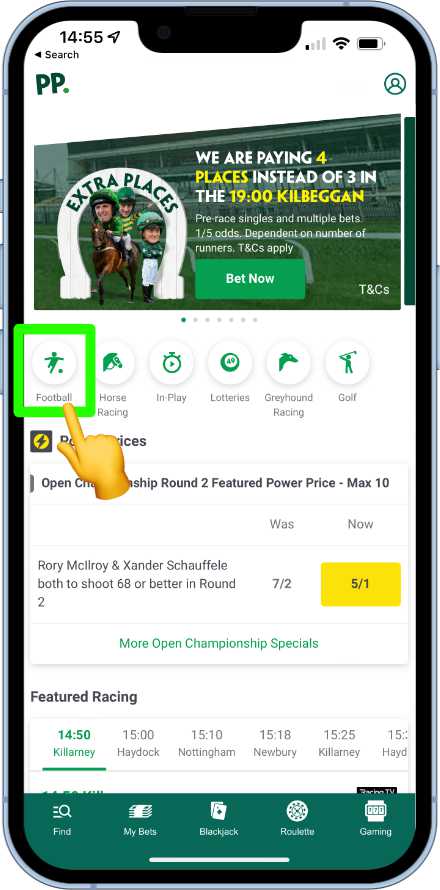
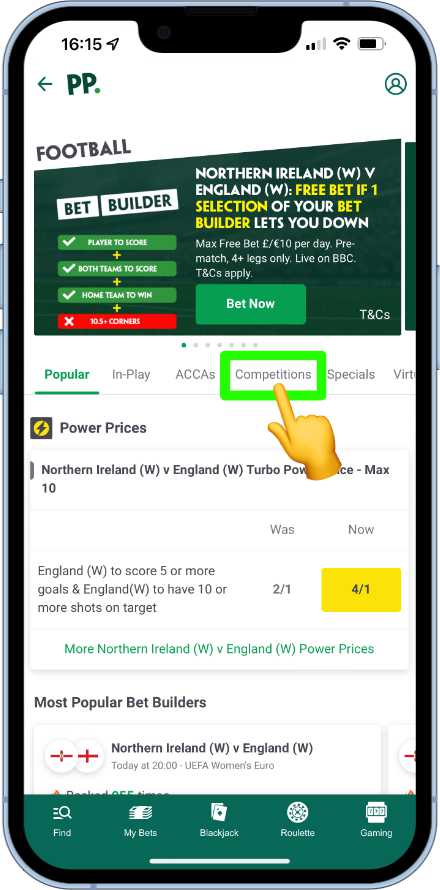
As the user is looking to make multiple picks from the same league, they can tap on the competitions tab to find the league.
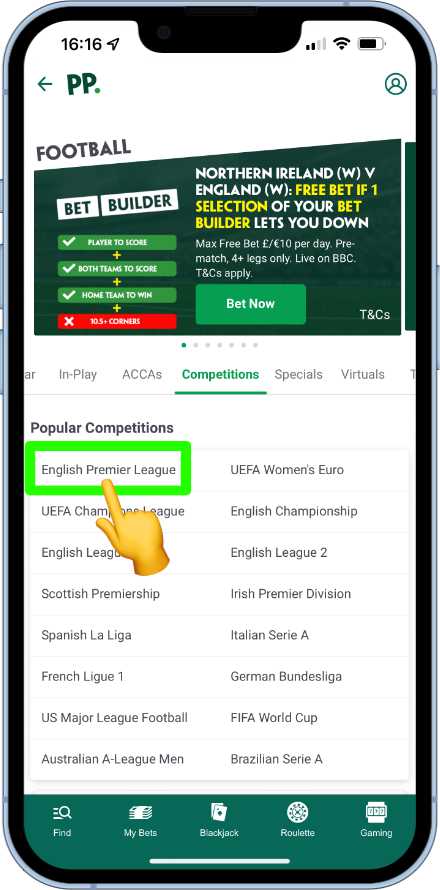
The English Premier League now appears and can be tapped on to reveal the upcoming fixtures.
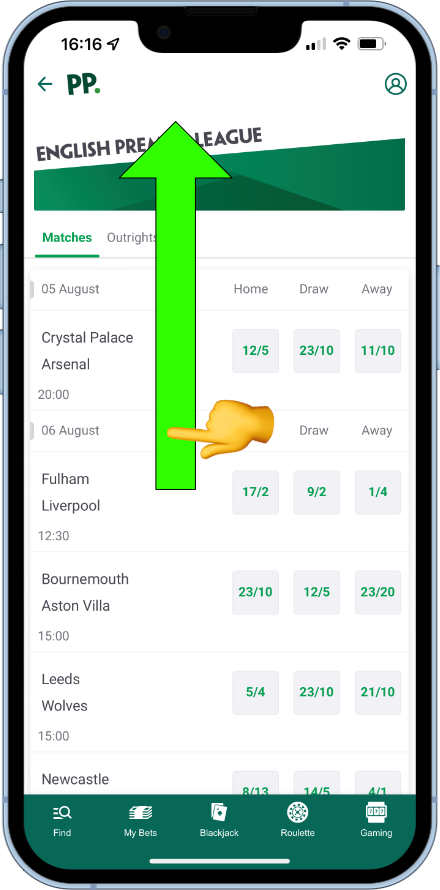
fixtures that are of interest occur on the 6th August. Scrolling down the page will reveal more fixtures.
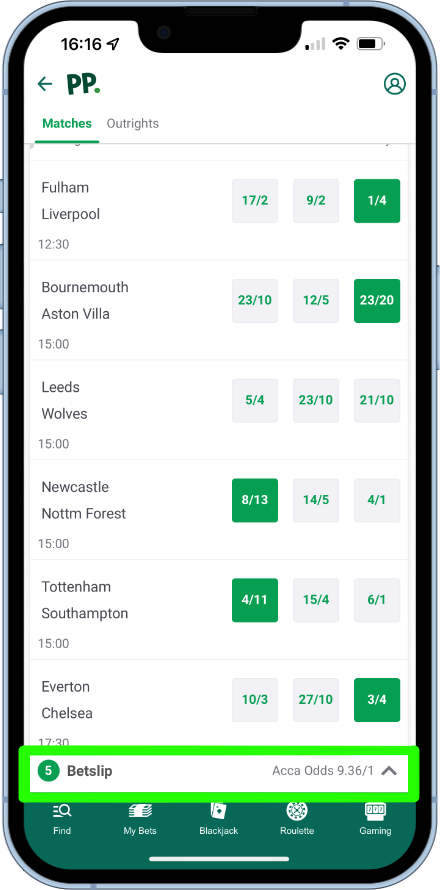
The user can now browse all of the fixtures and start to make selections by tapping on the relevant price. When a selection has been made, the price will turn green and a minimised bet slip bar will appear at the bottom.
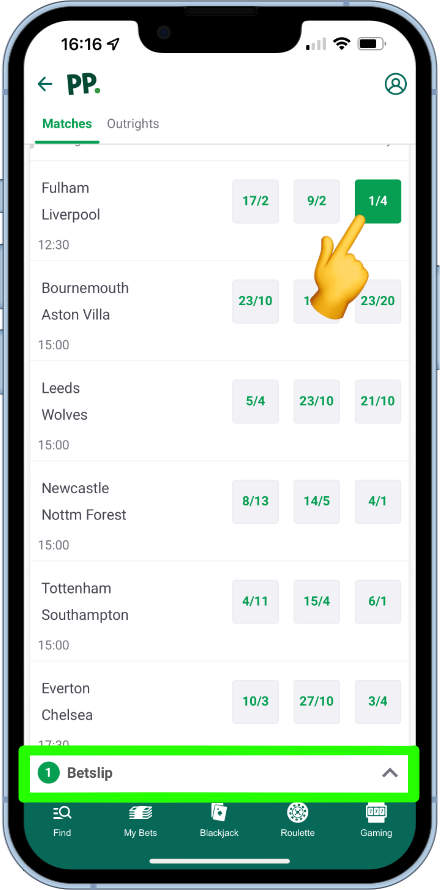
As an accumulator is the desired bet here, more picks can now be made until seen as fit to bet on.
As more selections are added, the combined odds of all picks will flash and show temporarily in the bet slip bar.
In this example the user has been left happy after making five selections. They can now tap on the bet slip bar to set a stake.
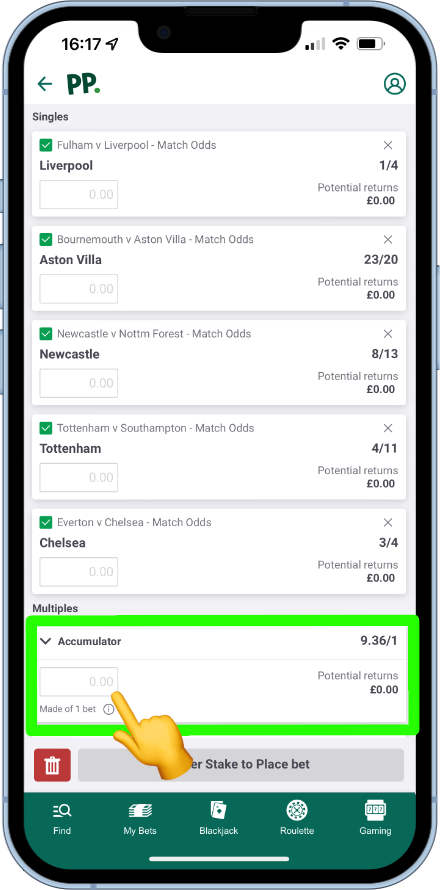
The bet slip will now open, showing each individual selection. Singles can be placed by using the stake fields underneath the relevant selection.
Multiple bet options show at the bottom of the bet slip and the player will need to set a stake in the accumulator field by tapping on it.
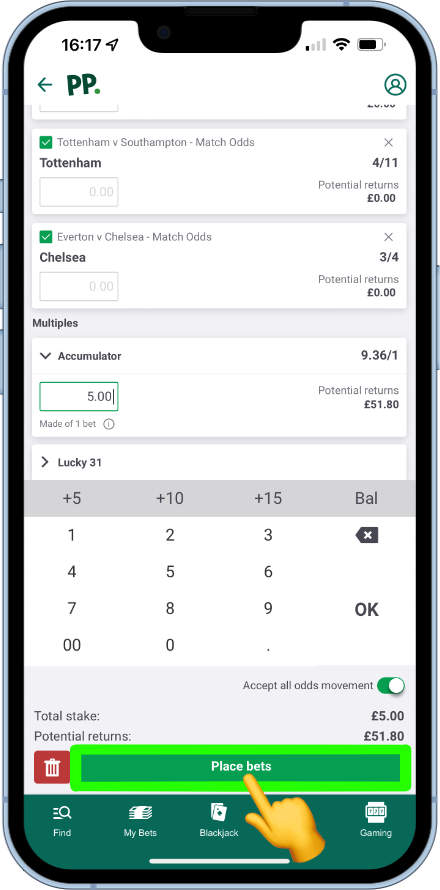
As it is a £5 bet we are looking to place, we can go ahead and input £5 using the numeric keypad that pops up. The potential returns will now show, based on the stake amount set. All that is left now is to tap on the “Place bets” button to confirm and commit to the bet.
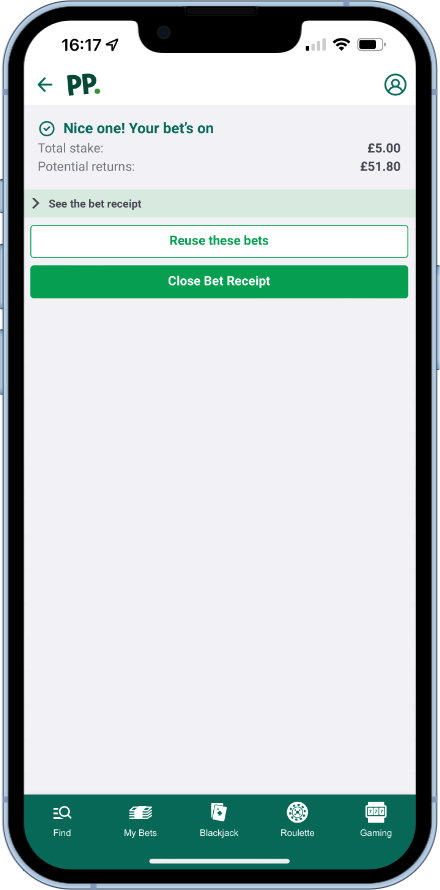
A small confirmation summary will now be presented. The confirmation can either be closed down at this point to carry on browsing the Paddy Power app, or the app can now be shut down completely, for the focus to be directed elsewhere.
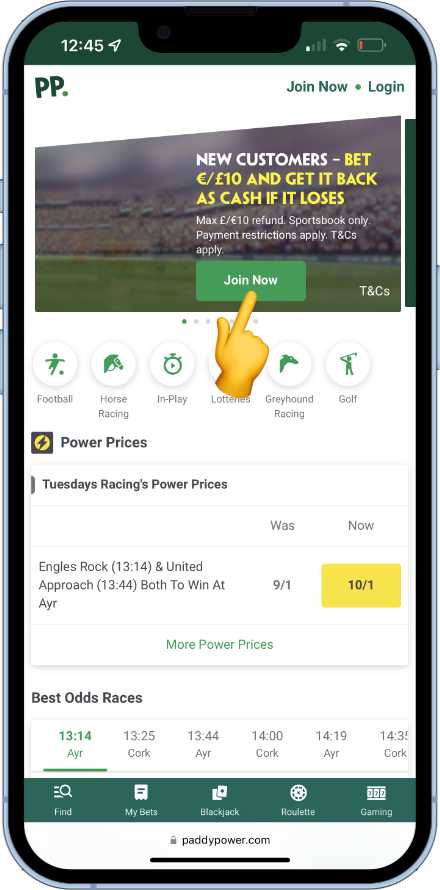
Tapping on the Join Now button will open up the registration form. Enter the fields that are required. It is important to make sure the answers are true and accurate, as details could be asked to be verified later.
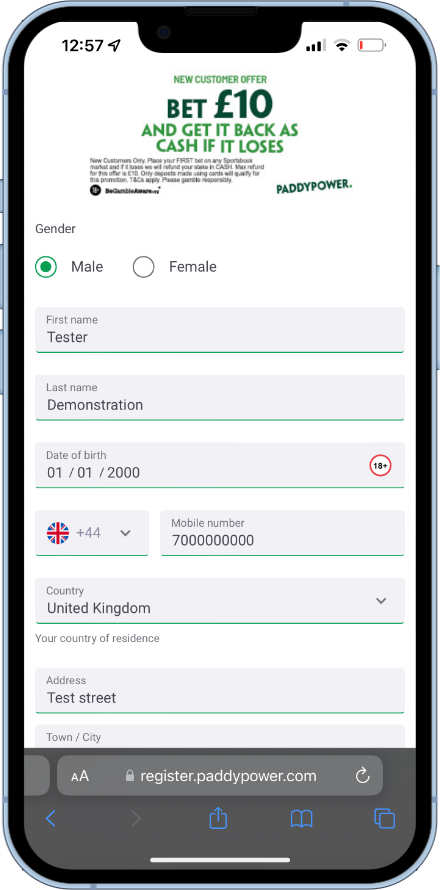
Full details that are required in the first step are:
- Gender
- First name
- Last name
- Date of birth
- Mobile phone number
- Country of residence
- Full Postal address
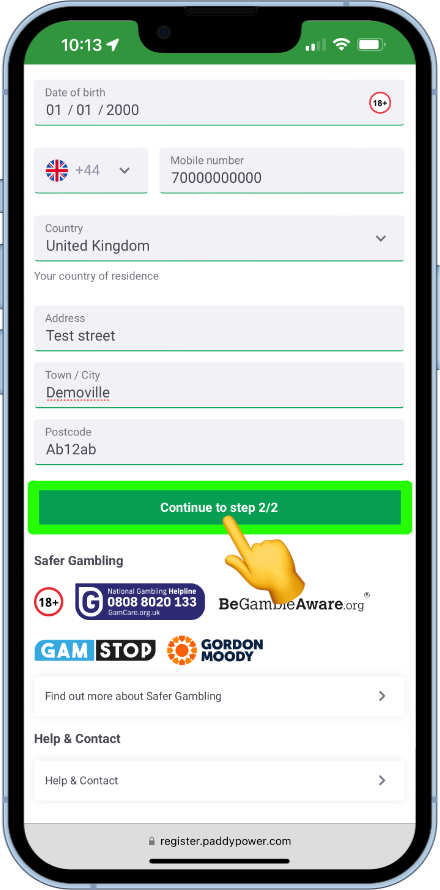
Once all details have been completed, the “continue to step 2/2 button” will now activate. Tap on it to proceed.
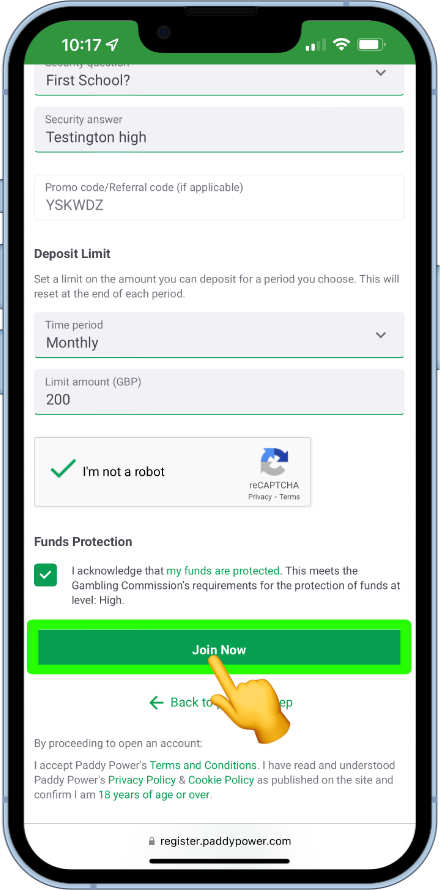
An email address and password for the account will now be asked for, alongside a security question, in case the password is forgotten.
The promo code box should already have the promo code entered, thanks to our friendly link above.
A deposit limit will needed to be set for the account. This can either be set as a daily, weekly or monthly limit.
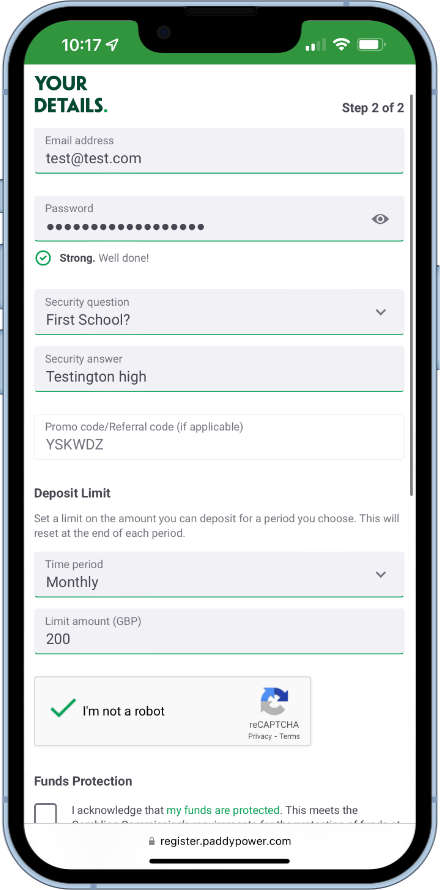
Now all that is left is to complete the reCAPTCHA test to prove you are not a robot, tap to agree to the funds protection statement and then the join now button will activate and be ready to press. This will complete the registration.
The user should now be a fully registered Paddy Power customer. They will now be able to set up a payment method, deposit funds, place bets and take part in promotions.
The user may be prompted after registration to verify the details entered. You can find out more about this further down this page.
Funds can be deposited in to a Paddy account via
- Apple Pay
- Debit card
- Bank transfer
- Paysafecard
- Skrill
- Neteller
- MuchBetter
- Rapid Transfer
- PayPal
- Paddy Power cash card
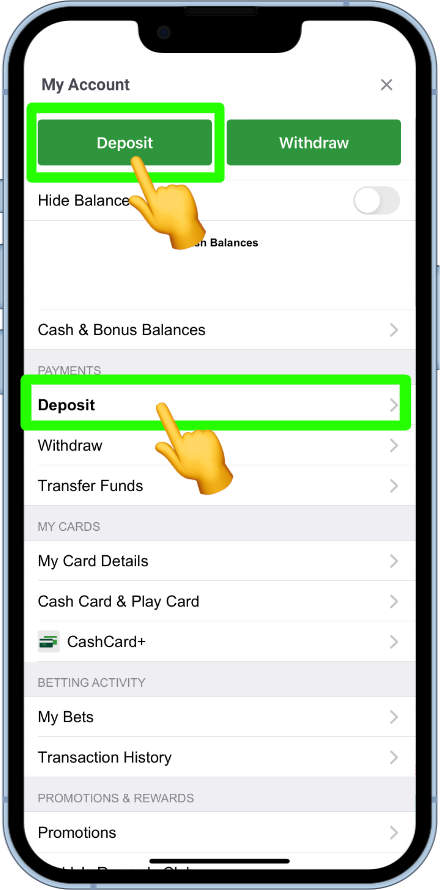
To set up a deposit, from the home page, tap on the user settings icon.
The deposit button should now appear at the top of the settings, alongside a withdraw button. There should also be a link to deposit in the payment section. Tap on either to select a deposit method.
Popular deposit methods are Apple Pay (for iOS users) and debit card. These are quick both in terms of depositing and withdrawing and also have a lower minimum deposit allowance. These methods facilitate minimum deposits of £5, whereas other deposit methods operate with a £20 minimum.
To show how quick it is to deposit, we are going to demonstrate using Apple Pay from an iPhone.
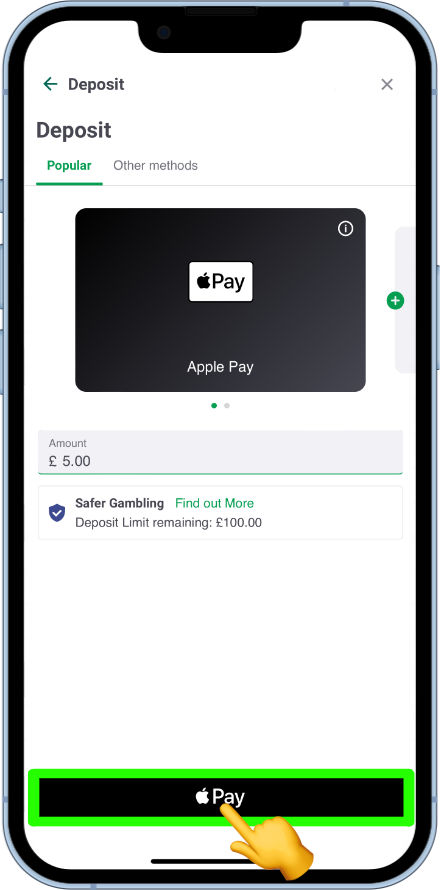
Select Apple Pay from the popular payment method tabs. Make sure the amount showing is the amount looking to be deposited. If it is not tap on it to change the amount. When the correct amount is entered, tap on the Pay button at the bottom.
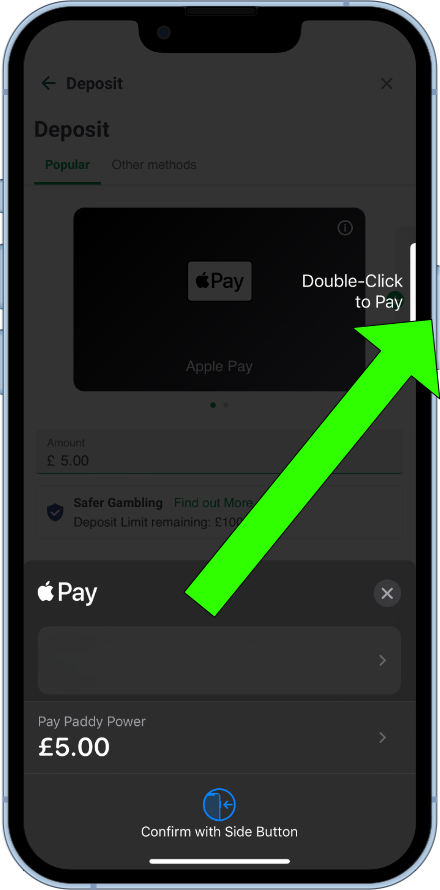
Apple Pay security conformation will now appear. Double click the power button to confirm the request.
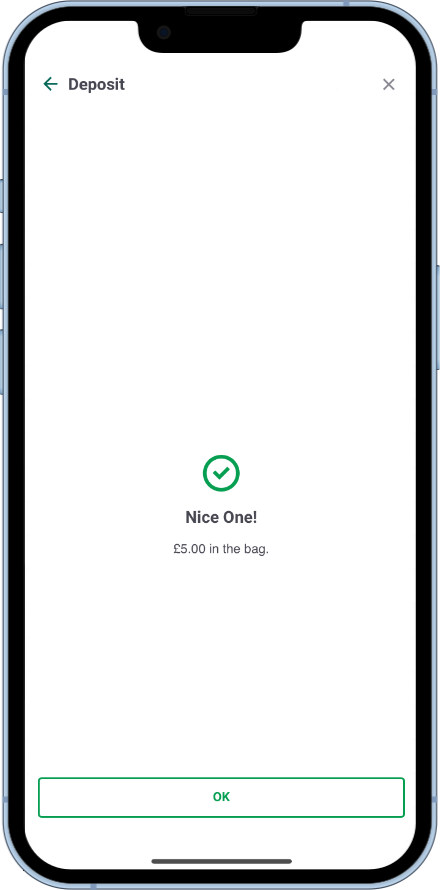
The user will now have to pass the face ID/Touch ID/Passcode checks as set up on the iPhone. Once done, funds will now be successfully transferred to the Paddy Power account.
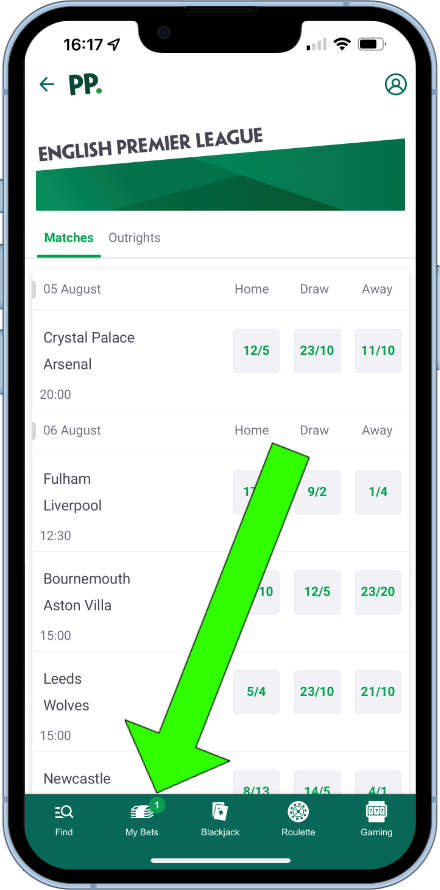
To check on open and recent settled bets, tap on the “My Bets” icon in the bottom menu bar.
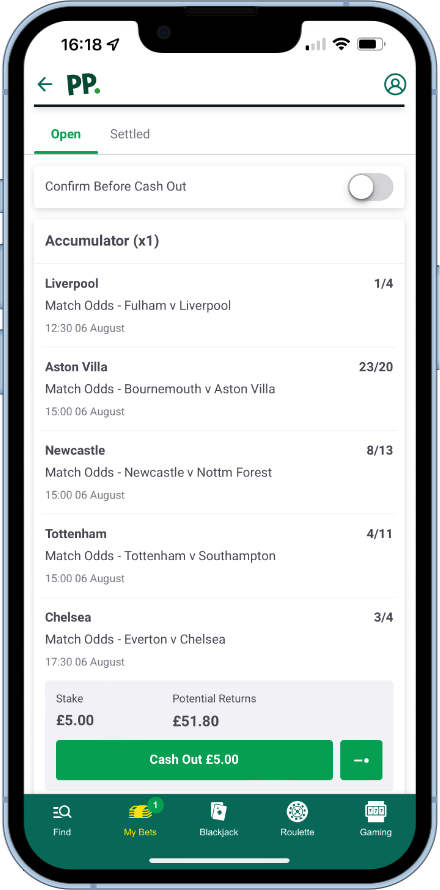
All open bets will now show in a scrollable list. Any cash outs being offered on the open bets will also show here at the bottom of the corresponding bet.
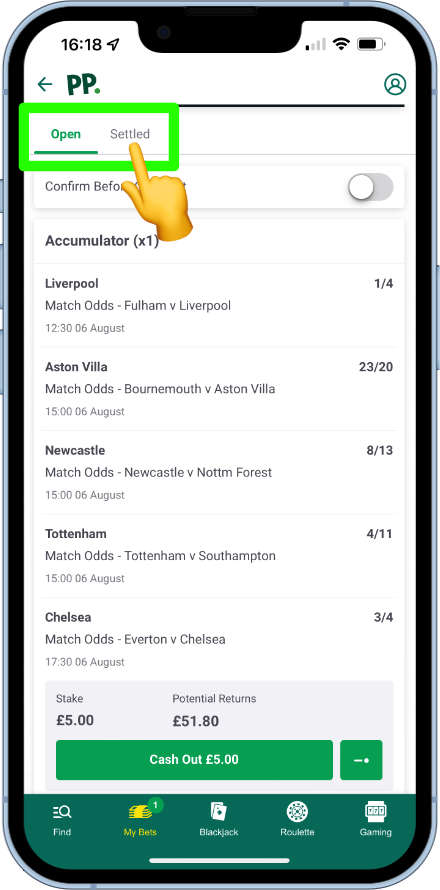
Recent settled bets can viewed by toggling the top filter.
There are a couple of reasons why Paddy Power may ask for further information beyond the registration process. These are:
- Affordability checks – Paddy Power have a legal responsibility to make sure players are playing within their means. Therefore, if a player is betting big stakes, or has suddenly increased the amount they are gambling, Paddy Power may ask to see source of funds.
- Identity checks – Paddy Power are also required to ensure players are of legal age for their territory, which in the UK is 18. There may be a situation where the digital checks that Paddy Power do in the background to link bank accounts and home addresses may bring back insufficient confirmation. Therefore, proof of address, bank statements, or photo ID may be asked for.
If documentation is requested, Paddy Power will be specific in what will needed to be supplied.
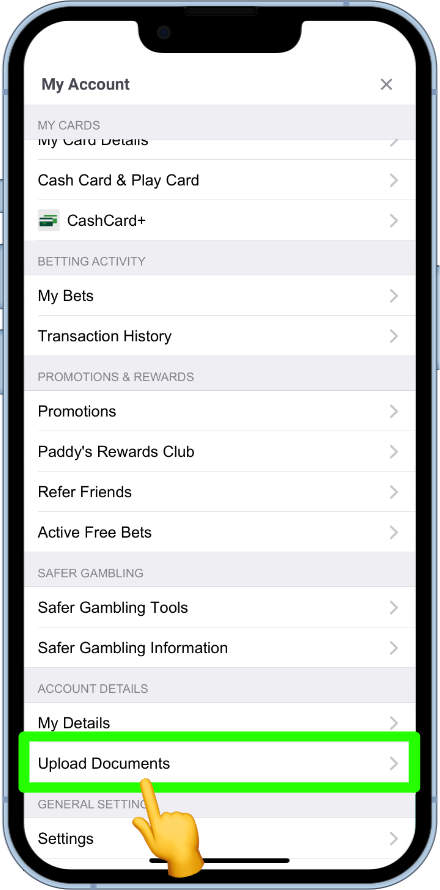
To upload the documents from the Paddy Power app, head to the user settings from the home page.
Scroll down and towards the bottom there will be a section labelled account details. From this section, tap on the upload documents box.
A list of all the documents that can be requested will now show. Tap and upload relevant documents asked for.
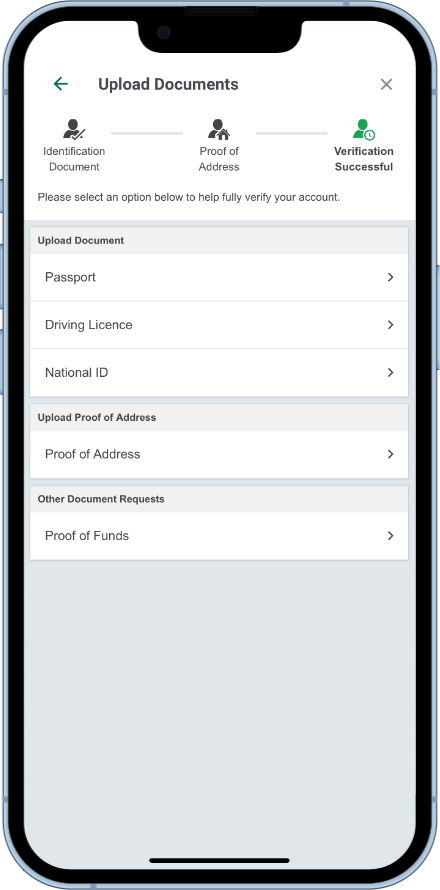
The photos/documents will then be sent for the paddy Power verification team to review.
Paddy Power offer a wide range of withdrawal options that cater for the hardcore gambler right down to the punter who bets on the Grand National once a year.
Regular withdrawal methods are offered. However from those, Paddy Power prefer customers to withdraw back using the same method that was used to deposit funds.
For the more frequent gambler, Paddy Power offer branded cash cards that can be used to withdraw funds from Paddy Power shops and ATMs.
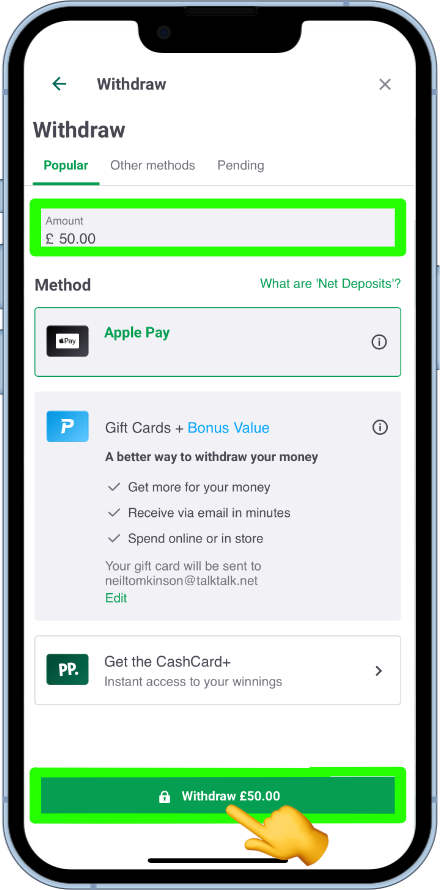
To start a withdrawal request, head to the user settings.
Now tap on the Withdraw button at the top of the menu.

Enter the amount to be withdrawn in the top field and make sure the correct withdrawal method is highlighted. When happy tap on the withdraw button.
Paddy Power offer two methods of closing an account, depending on the circumstance.
The first is a regular account closure for someone who no longer wishes to bet with Paddy Power, but may want to do so again in the future.
This option must be done through the Live help service. To get there, tap on the user account settings icon.
Now scroll down to the very bottom of the menu and tap on the help and support link.
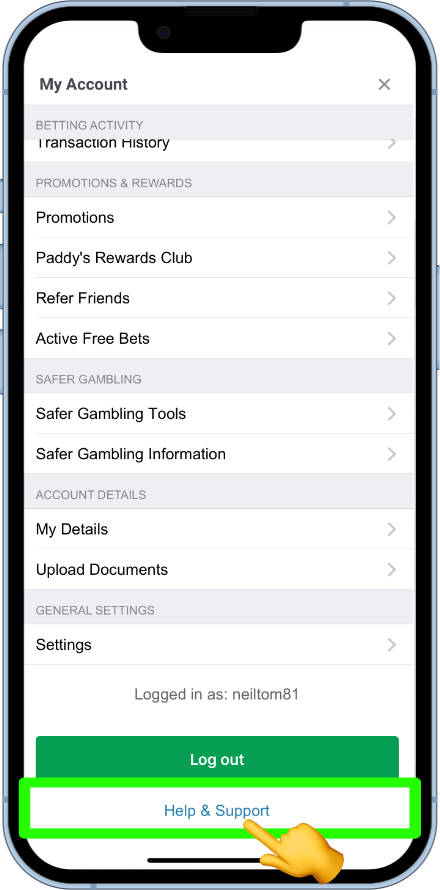
The Help Centre will now open up. Scroll down again to find the message us button. Tapping this will open up the live chat system.
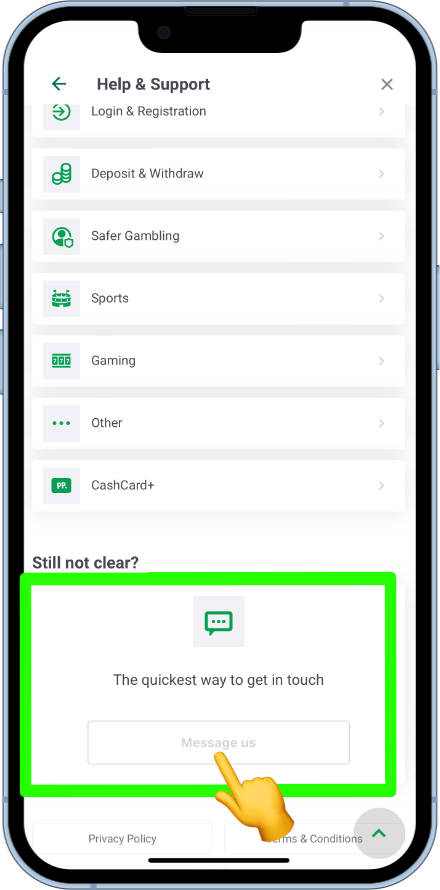
A paddy Power customer support agent will now aid in helping with any issue including successfully closing an account.
The second option caters for a permanent closure for those who have developed a gambling problem.
An account can be permanently closed from the self exclusion tool. You can find out more about this from the Responsible Gambling tools section below.
Recent bets can be viewed from within the MyBets section as explained further up this page. However, users can take a more historic look back at their bets from the user menu.
Once open, tap on transaction history from the Betting Activity category.
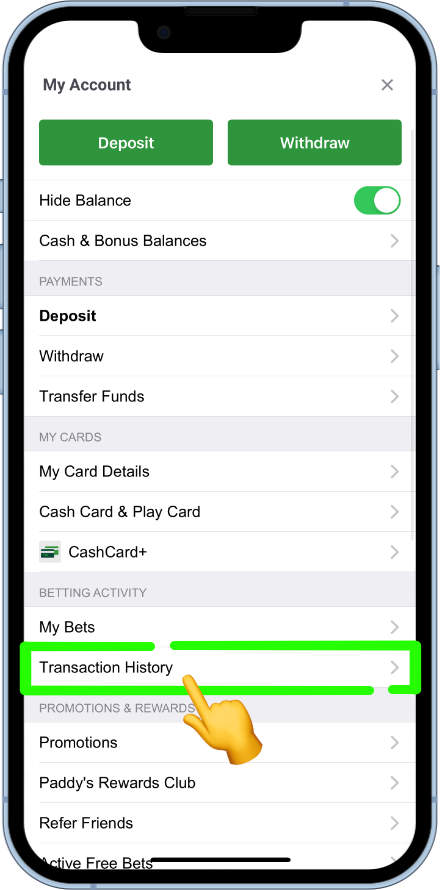
From here users can set whatever date range they like to view all transactions made within that time period.
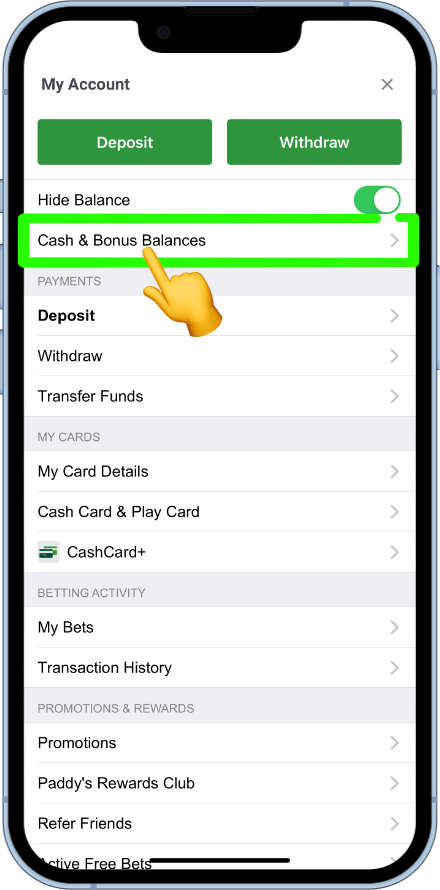
Free bets can be earned or awarded regularly, especially to those customers who like to opt in and take part in the promotions. Any free bets can be viewed by tapping on the user menu icon.
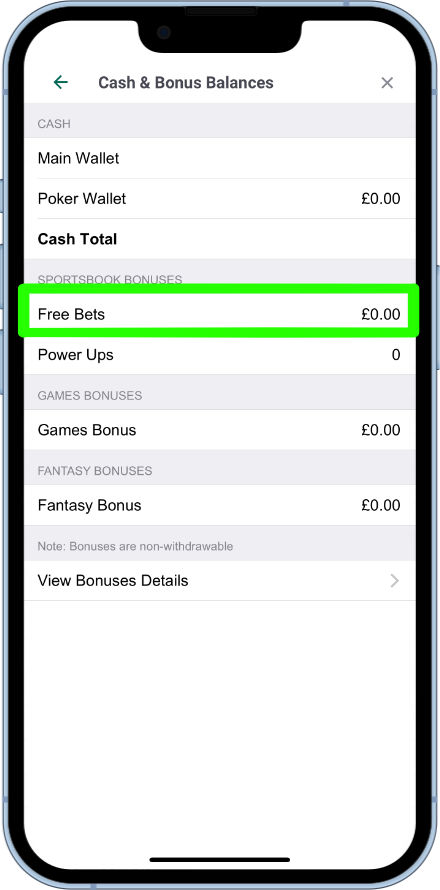
Now head to Cash & Bonus Balances.
All bonuses and free bets linked to the account will be displayed here.
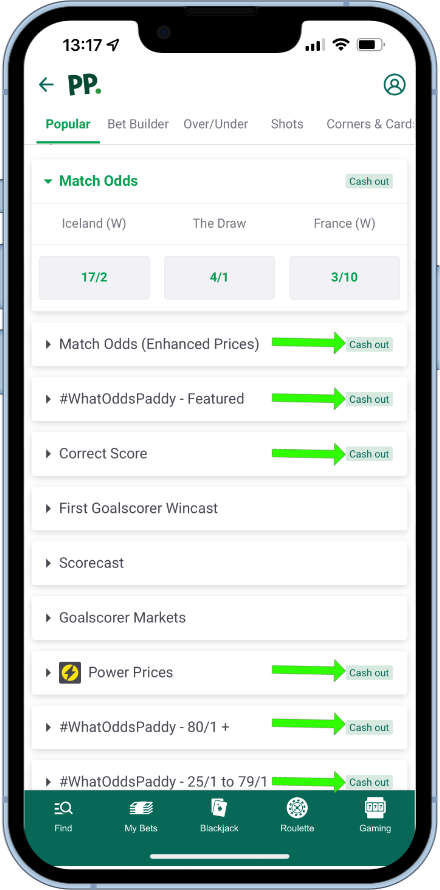
Paddy Power make it incredibly easy to establish which markets have cash out options associated to them.
Tapping on an event with reveal all of the available betting markets for it. Any market that has cash out options is clearly labelled as such.
Any market that does not have this icon, is not eligible for a cash out.
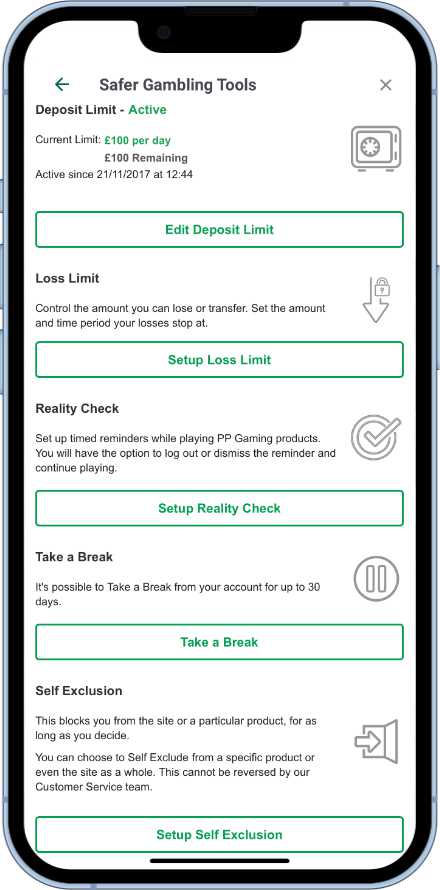
Paddy Power offer five different tools to try to keep their customers gambling responsibly.
These are:
- Deposit limits – set daily, weekly and/or monthly deposit limits.
- Loss limits – loss limits can be set in the account daily, weekly, monthly or annually.
- Reality Check – Set reminders to keep track of time while playing/betting.
- Take A Break – Temporarily close down the account for a period up to 30 days.
- Self Exclude – Choose to self exclude from some or all of Paddy Powers services from 6 months to permanently. Once set this cannot be reversed until the time period has expired. In the case of permanently being chosen, the account will not be able to be re-opened at any time.
To get to the responsible gambling tools, head to the user account menu.
Now scroll down and select the safer gambling tools from the safer gambling section.
All responsible gambling tools will now be listed and available to access.
Paddy Power have a comprehensive help section, that can provide answers and help about their services. To get there start by entering the user menu.
At the bottom of the menu, the help link can be located.
The help section will now be opened up. From here users can use the search field to type in their query, or use the live chat service from the message centre to speak to a customer service agent.
We are also more than happy to help, if we can. We can be reached at @bettingapps on Twitter.